- Upgrade storage when capacity stays above 80% for four consecutive weeks.
- Frequent stockouts, mispicks, or delayed dispatch signal storage layout and system limits.
- Order volume growth above 20% year-on-year often outpaces shelving and racking capacity.
- Rising SKU counts require bin locations, labelling, and tracking beyond spreadsheets.
- Labour hours spent searching and re-handling stock indicate poor space utilisation.
- Compliance needs, such as temperature control or segregation, can force earlier upgrades.
Signs Your Current Storage System Is Constraining Growth
In 2024, UK labour productivity fell by 0.8% compared with 2023 (Office for National Statistics). When storage layouts force extra walking, double-handling, or frequent rework, that decline translates into measurable cost per order. A constrained storage system usually shows up as slower pick rates, higher error rates, and a growing backlog during peak weeks.
- Space utilisation exceeds 85% of available pallet or shelf locations for more than 4 consecutive weeks, leaving no buffer for inbound spikes.
- Pickers walk more than 10 km per shift or spend over 20% of time searching for stock, indicating poor slotting and inadequate location labelling.
- Order errors rise above 1% of lines picked, or returns increase by 15% year-on-year, often linked to congested aisles and mixed SKU storage.
- Stockouts occur at least twice per month despite stable demand, suggesting inaccurate counts caused by overflow storage and untracked locations.
These signals matter because storage constraints compound as volumes grow: each extra handling step adds minutes per order and increases damage risk. If inbound deliveries regularly sit on the floor for more than 24 hours, or you rely on temporary stacking to cope, upgrading racking, shelving, or layout design becomes a commercial necessity. A specialist such as Racking and Shelving Company can assess aisle widths, load ratings, and slotting rules to recover capacity without expanding the building footprint. 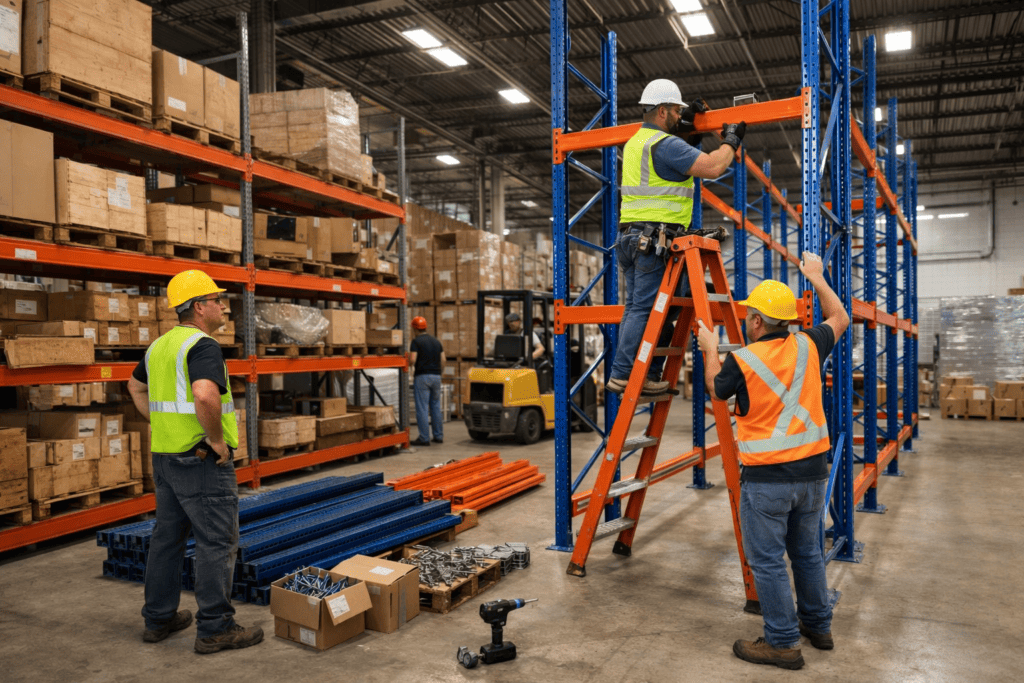
Capacity Planning: Forecasting Storage Needs for the Next 12–36 Months
A Midlands e-commerce wholesaler entered 2025 with 1,200 pallet locations and steady growth. By August, inbound containers arrived twice weekly, but the site planned capacity using last year’s averages. The business hit 92% occupancy for six weeks, so staff staged pallets in aisles and re-slotted fast movers daily. Pick time per order line rose from 38 seconds to 52 seconds, while overtime increased by 18%. Capacity planning prevents that squeeze by forecasting storage demand across 12–36 months, not just the next peak. Start with a baseline: current SKU count, average pallets or bins per SKU, and weekly inbound volume. Apply growth assumptions tied to commercial plans, such as a 25% SKU expansion after a new supplier agreement or a 15% uplift in order lines from a marketplace launch. Convert those changes into required locations and set a buffer; many operators target 10–15% headroom to absorb promotions and supplier variability. For most growing sites, the upgrade trigger appears when forecasts show occupancy exceeding 85% within 12 months, even after layout optimisation. Use UK inflation and demand signals to stress-test scenarios; the Office for National Statistics provides CPI and retail indicators to quantify cost and volume risk.
Performance Triggers: When Latency, Throughput, and IOPS Demand an Upgrade
Capacity shortfalls restrict where you can put stock; performance shortfalls restrict how fast you can move it. A business can still have free locations and miss dispatch cut-offs because the storage system cannot sustain required latency, throughput, or IOPS (input/output operations per second) during peak waves. Option A: optimise the current system by re-slotting, changing pick paths, and tightening replenishment timing. Option B: upgrade by adding higher-speed pick modules, conveyor and sortation, or automated storage and retrieval to raise sustained flow rates.
| Trigger | Optimise (Option A) | Upgrade (Option B) |
|---|---|---|
| Wave latency (release to first pick) | Stays under 10 minutes after re-slotting | Exceeds 15–20 minutes on 3+ peak days per week |
| Throughput (order lines per hour) | Improves by 5–10% with labour balancing | Stalls within 2–3% of the same ceiling for 8+ weeks |
| IOPS analogue (touches per line) | Holds at 1.1–1.3 touches per line | Rises above 1.5 touches per line due to double-handling |
Practically, treat performance triggers as a service-level risk. If peak-day dispatch misses exceed 2% for two consecutive months, or overtime rises above 15% to “buy” throughput, the layout has reached its economic limit. At that point, review warehouse storage options that increase flow, not just capacity, and model payback against avoided labour hours and fewer late shipments.
Risk and Compliance Thresholds: Backup, Recovery, Security, and Retention Requirements
Upgrade when audit evidence shows your setup cannot meet backup, recovery, security, or retention targets. If restore tests exceed your recovery time objective (RTO) by 30 minutes, or you cannot prove a 3-2-1 backup pattern (three copies, two media types, one off-site), risk shifts from theoretical to operational. Align controls to NCSC 10 Steps and retention to UK GDPR storage limitation. Implement by setting RTO and recovery point objective (RPO) per system, then running quarterly restore drills and logging pass/fail times. Encrypt data at rest with AES-256, enforce multi-factor authentication, and use immutable backups with 14–30 days of lock. After the upgrade, firms often cut restore time from hours to under 60 minutes and reduce ransomware exposure by keeping clean, unchangeable copies.
Upgrade Path Options: Scale-Up vs Scale-Out, Cloud vs On-Premises, and Hybrid Architectures
As of 2024, 60% of organisations used at least one public cloud service, while 45% ran hybrid cloud (UK Government, Cyber Security Breaches Survey 2024). Those adoption rates matter because upgrade choices now affect unit cost, resilience, and deployment speed, not only capacity. A practical decision framework compares scale-up (bigger single system) versus scale-out (more nodes), then maps each to cloud, on-premises, or hybrid delivery. Scale-up suits stable SKU counts and predictable peaks because it can lift throughput by 20–40% with fewer integration changes, but it concentrates risk into one platform. Scale-out fits fast growth because it adds capacity in smaller steps, often 10–25% at a time, and reduces single points of failure. Cloud storage can cut procurement lead times from 8–12 weeks to days, while on-premises can deliver lower per-unit cost once utilisation stays above 70–80%. Hybrid architectures work when compliance or latency keeps core stock on-site, while overflow and backups move off-site. Align physical reconfiguration with the IT roadmap by selecting modular warehouse systems such as Dexion Racking, which supports phased expansion without reworking the full layout.
Commercial Evaluation: Total Cost of Ownership, Vendor Contracts, and Upgrade Timing
A Manchester-based importer renewed a five-year racking and warehouse management contract in April 2025 to secure a 12% discount. Six months later, order lines rose by 28%, yet the site could not add bays without paying a break fee equal to nine months of service charges. The business also faced a 14-week lead time for uprights and beams, so managers paid for short-term overflow storage while waiting for the upgrade. This is a total cost of ownership problem, not a capacity problem. TCO includes capital spend, maintenance, energy, training time, and contract penalties, which often exceed the headline price of new equipment. When a vendor agreement locks pricing or limits change requests, the cheapest option can become the most expensive once volume shifts. Use upgrade timing to protect commercial flexibility. If forecasts show a 20–30% volume step-change within 12 months, negotiate break clauses, staged delivery, and price holds before signing. Align renewal dates with procurement lead times and peak season, so the upgrade lands when disruption costs the least.
Frequently Asked Questions
What storage capacity and performance thresholds indicate it is time to upgrade a business storage system?
Upgrade when usable capacity stays above 80% for 30+ days, or growth exceeds 10% per month and forecasting shows you will hit 90% within 90 days. Performance triggers include sustained latency above 20 ms, IOPS shortfalls of 25% versus peak demand, or backup windows exceeding 8 hours and affecting business hours.
How can a business quantify the cost of storage downtime versus the cost of upgrading?
Quantify downtime by multiplying lost revenue per hour, staff idle time, recovery labour, and penalties by annual outage hours. Use logs to measure mean time to recover and incident frequency. Compare this annualised loss with upgrade costs: hardware, licences, migration services, and 3–5-year support. Upgrade when payback falls under 12–24 months.
Which storage upgrade path fits best: NAS, SAN, cloud storage, or hybrid storage?
Choose NAS for 5–100 users needing simple file sharing (typically 20–200 TB). Choose SAN for high-IOPS databases and virtual machines, often 10–100+ Gbps and sub-5 ms latency. Choose cloud storage for variable demand and off-site resilience, paying per GB-month. Choose hybrid when 30–70% data stays on-premises for performance or compliance.
What security and compliance requirements typically trigger a storage system upgrade for growing businesses?
Security and compliance triggers include adopting encryption at rest and in transit, enforcing role-based access with multi-factor authentication, and meeting audit logging and retention rules. Upgrades often follow requirements for immutable backups against ransomware, tighter recovery targets (for example, RPO under 1 hour), and formal certifications such as ISO 27001, SOC 2, PCI DSS, or HIPAA.
How should a business plan data migration and minimise disruption when upgrading its storage system?
Plan migration in phases: audit data volumes and dependencies, then prioritise critical workloads. Run a pilot on 5–10% of data, validate performance, and set rollback steps. Schedule cutovers in low-usage windows, using incremental replication to keep downtime under 30–60 minutes. Communicate a freeze period, test backups, and monitor latency and error rates during go-live.