Key takeaways
- Ask for a review right after a clear win, like delivery or issue resolution.
- Use a short, direct request and give one simple next step.
- Offer email scripts that personalise the ask with the service and staff name.
- Keep SMS requests brief, send once, and avoid repeated follow-ups.
- Use in-person wording that invites honest feedback, not only five-star ratings.
- Make it easy to say no, and thank customers whether they review or not.
Why Google reviews matter and what “not pushy” sounds like
In 2024, BrightLocal reported that 83% of consumers read online reviews for local businesses, and 57% said reviews influenced which local business they chose. That makes Google Business Profile reviews a high-impact trust signal at the exact moment people compare options.
A steady flow of recent reviews can also help your listing look active, which supports click-throughs from Maps and Search. “Not pushy” sounds like a clear request with low pressure and a quick exit.
Keep the ask short, ask once, and make it easy to say no. In practice, that means you request feedback after a completed job, you explain the benefit in one line (helping other customers), and you share one direct link. You avoid repeated follow-ups, incentives, and language that implies a required review.
Timing shapes tone. Ask within 24–48 hours of delivery, while the experience stays fresh. If you send a reminder, send only one, 3–7 days later, and stop if the customer does not respond. A simple, policy-compliant funnel uses 3 steps: (1) ask for feedback, (2) if the customer agrees, share the Google review link, (3) thank the customer either way. This approach stays respectful and reduces the risk of sounding demanding.

Google review policies and compliance rules to follow before you ask
A customer thanks you at the till and says the service was “spot on”. That is the best moment to ask, but only if the request stays within Google’s rules. Google’s user-contributed content policies ban review gating (only asking happy customers) and ban incentives such as discounts or gifts for reviews.
Google also expects reviews to reflect genuine experiences, so you should never write reviews for customers or ask staff, friends, or family to post reviews that are not real. Use one neutral ask for every customer, then send one follow-up if no review arrives.
Keep the message short, include a direct link to your Google Business Profile review form, and avoid language that pressures a 5-star rating. If a customer reports a problem, route that person to support first and pause the review request until the issue is resolved.
Timing rules: when to request a review and when to wait
Ask too early and the request feels transactional; ask too late and the customer forgets details. The best timing sits between those extremes, when the outcome is clear and the experience is fresh. Option A is to request a review right after delivery or resolution. Option B is to wait until the customer has used the product or seen results. Option A suits clear outcomes such as an appointment, a finished job, or a closed support ticket.
Option B fits value that appears over time, such as software onboarding, deliveries that need testing, or services with a follow-up stage. The key difference is certainty. If the customer can judge the experience now, a same-day request reduces memory fade and can lift reply rates. If setup steps or possible problems remain, waiting avoids a premature review. Set a simple rule: trigger the request after a confirmed “done” moment, not after payment.
For longer journeys, send it after the first measurable success, such as a completed installation or a resolved first query. If a complaint is open, a refund is pending, or a delivery is incomplete, wait until the customer confirms the outcome and the conversation has closed. For a policy-compliant funnel, use two touches: one request, then one reminder if there is no response. Stop after the reminder, and do not change who receives the request based on satisfaction signals.
Email scripts: Google review request templates for different situations
Most review emails fail for one measurable reason: the customer opens the message, but does not act. The usual causes are a vague ask, no direct link, and a tone that sounds like a favour request instead of a quick task. You can fix this with short, channel-appropriate templates that (1) name the completed outcome, (2) ask for a review in one sentence, and (3) make the next step one click.
Core email structure (use this every time)
- Subject: clear and neutral (6–10 words).
- First line: confirm the outcome (job done, delivery received, issue resolved).
- Ask: one sentence, no guilt language.
- Link: a single Google review link (no extra buttons).
- Close: thank them and offer help if anything is not right.
Google review request templates (copy and edit)
1) Standard post-service email (send within 24 hours)
Subject:
Quick feedback on your recent visit Hello [Name], Thank you for choosing [Business]. If you have 60 seconds, please share your experience in a Google review. Your feedback helps other customers choose with confidence. [Insert your Google review link]
Thank you, [Name], [Role] [Phone]
2) After a support issue is resolved (send 2–4 hours after resolution)
Subject: Was your issue resolved today? Hello [Name], I am glad we could resolve [issue]. If you are happy to, please leave a Google review about your support experience. It helps us improve and helps others know what to expect.
[Insert your Google review link]
Kind regards,
[Name]
3) After delivery or completion (send when the outcome is clear)
Subject: Your [order/job] is complete Hello [Name], Your [order/job] is complete. If everything looks right, would you share a short Google review? One or two sentences is enough. [Insert your Google review link]
Thank you, [Name]
4) Polite reminder (send once, 3–7 days later)
Subject: Reminder: share feedback (optional) Hello [Name], A quick reminder in case you missed this. If you would like to leave a Google review, here is the link. If not, no problem at all. [Insert your Google review link]
Thanks again, [Name]
Implementation steps (timing + a simple, policy-compliant funnel)
- Create one Google review link from your Google Business Profile and store it in your email signature snippet.
- Trigger Email 1 based on a real event: job marked complete, order delivered, or ticket closed.
- Send a single reminder only to non-clickers or non-reviewers, not to “happy customers” only. This avoids review gating.
- Route complaints to support by adding one line: “If anything is not right, reply to this email and we will fix it.”
Expected results (what improves when you do this)
Clear subjects lift opens, direct links reduce drop-off, and one reminder recovers missed opportunities. The tone stays neutral, the request stays optional, and the process stays aligned with Google’s user-contributed content policies.
SMS scripts: short review request SMS script options with link placement
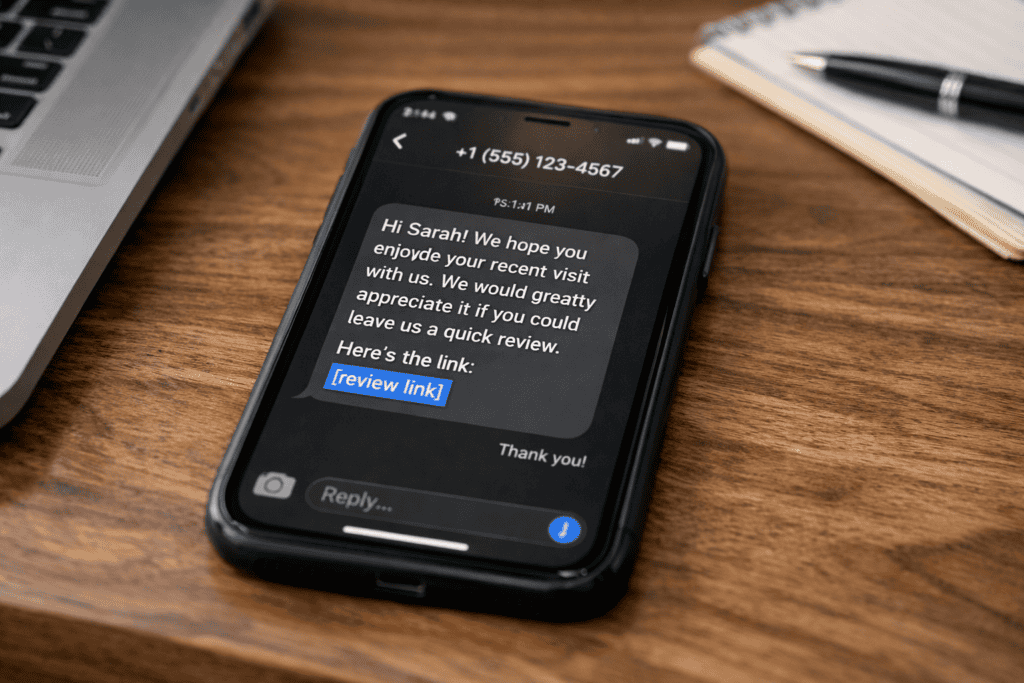
SMS works because it gets seen quickly. Gartner reports 90% of SMS messages are read within three minutes. That speed makes SMS ideal for review requests when the service is fresh in the customer’s mind. It also reduces the risk of the message getting buried in an inbox. When customers act fast, you often get shorter, clearer feedback. Keep the message under 160 characters where possible, use one clear link, and ask once. A short SMS feels like a helpful prompt, not a sales push. Use plain words and avoid extra offers or attachments. If you include a name, double-check spelling to prevent mistrust.
Link placement rules (so the SMS stays clean)
- Use one link only. Two links can look spammy and split attention.
- Place the link at the end so the request reads naturally before the URL.
- Use your direct Google review link (the “Write a review” link from your Google Business Profile) to cut steps.
- Identify your business in the first 6–10 words, so the message is not confusing.
Short SMS scripts (copy, paste, and personalise)
Replace [Business], [Name], and [Link]. Keep the tone neutral and give an easy opt-out path if required by your SMS provider. If you serve multiple locations, include the branch name to avoid mix-ups.
- Standard after completion Hi [Name], thanks for choosing [Business]. Could you leave a quick Google review? It helps others find us: [Link]
- Service visit or appointment Hi [Name], thanks for coming in today. If you have 30 seconds, please share a Google review here: [Link]
- After a problem was resolved Hi [Name], glad we could sort that out. If you are happy with the fix, a Google review would help: [Link]
- Low-pressure, permission-based Hi [Name], would you be open to leaving a Google review for [Business]? If yes, here is the link: [Link]
- Warm and brief Thanks again, [Name]. Quick Google review? [Link]
Timing rules for SMS (simple and repeatable)
- Send within 15–60 minutes after a clear completion point (paid invoice, finished job, closed ticket).
- Wait 24–72 hours when the customer needs time to see results (repairs, treatments, complex installs).
- Send one reminder only, 3–7 days later, and only if the customer has not reviewed.
A simple, policy-compliant review funnel for SMS
- Trigger: mark the job “complete” in your system.
- Send: one SMS with a direct Google review link.
- Stop: if the customer replies with an issue, route to support instead of sending reminders.
- Track: log send date and outcome so you avoid repeat asks within 30 days.
In-person scripts and a simple, policy-compliant review funnel
A customer collects a repaired laptop, checks the screen, and says, “That is perfect, thank you.” You smile, hand over the receipt, and say: “I am glad it is sorted. If you have 30 seconds, would you mind leaving a Google review? It helps other people choose us. I can text you the link.” The customer can say yes or no without pressure, and the request stays focused on helping future customers. This works because the ask is specific, time-bound, and optional. It also avoids policy risks.
You are not offering a discount, and you are not filtering who gets asked. You are simply inviting feedback after a completed outcome, which aligns with Google’s user-contributed content policies. Use a simple funnel that keeps the tone consistent across channels. Step one: staff ask in person at the point of success, using the line above. Step two: send one follow-up message within 1–2 hours with a direct Google review link and a short opt-out line. Step three: if there is no response, send one reminder 3–5 days later, then stop. If a customer raises an issue, switch to support language: “Thank you for telling us. We will fix this first,” and pause any review request until resolved.
Frequently Asked Questions
How do you ask for Google reviews without sounding pushy in an email?
Ask soon after the service, keep the email short, and give an easy option to decline. Use a polite subject line, one clear link, and a simple call to action. A google review request template can help: “If you have 30 seconds, could you share a Google review? If not, no worries at all.”
What is a policy-compliant Google review request template you can copy and personalise?
Use this policy-compliant Google review request template:
- Email/SMS: “Hello [Name], thank you for choosing [Business]. Would you share an honest Google review about your experience? Here is the link: [Review Link]. If anything was not right, reply here so we can help. Thank you, [Your Name].”
What is a short review request SMS script that stays within character limits and still feels polite?
Use this review request SMS script (under 160 characters): “Hi [Name], thanks for choosing [Business]. Could you share a quick Google review? It helps us a lot. Link: [URL]. Thank you, [Your Name]”. Keep it short, include one link, and ask once.
When is the best time to ask for a Google review after a purchase or service, and how many reminders are acceptable?
Ask within 24–72 hours of delivery or service, while details stay fresh. For longer projects, ask after a clear milestone or final sign-off. Send no more than 2 reminders: one after 3–5 days, and one after 10–14 days. Use a short google review request template or review request sms script, then stop if there is no reply.
How can you set up a simple, Google policy-compliant review funnel to request reviews across email, SMS, and in-person touchpoints?
Use one neutral request across channels. After a completed service, send an email within 24 hours using a google review request template with one review link. Send one follow-up SMS 48–72 hours later using a review request sms script. Ask in person at checkout with the same wording. Do not offer incentives, gate by rating, or pressure customers.