For sale: Want to own a business forum ? Submit your sealed bid to acquire businessforum.uk

By using Apprenticeforums services you agree to our Cookies Use and Data Transfer outside the EU.
We and our partners operate globally and use cookies, including for analytics, personalisation, ads and Newsletters.

  • Join our UK Small business Forum

    Helping business owners with every day advice, tips and discussions with likeminded business owners. Become apart of a community surrounded by level headed business folk from around the UK


    Join us!

wuauclt.exe - a virus or a process

Power Lunch Club

Power Lunch Club

New Member
wuauclt.exe -

My computer keeps throwing this message up every ten minutes.
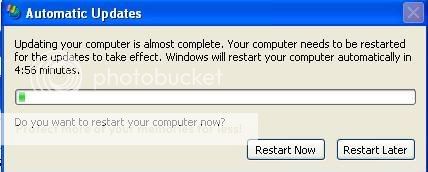
e61b1003.jpg


which is strange, because I haven't changed my update settings and never had this message before.

When I did a little research on it I found the process wuauclt.exe could be either a virus or a genuine process.

Run checks on computer, but coming back clean.

Any thoughts? This only started happening about 2 hours ago.
 
stugster

stugster

Active Member
You're worrying too much about computers mate: that's my job. You wouldn't catch me up at 5am trying to get rid of suspect infections! :D

Firstly: What service pack are you running? Right click MY COMPUTER choose PROPERTIES and it'll be displayed there.

Secondly: What anti-virus are you running? And... is it up to date?

Thirdly: There's a good chance it's just a glitch with that program - it's the Windows updater. Once we've established the SP and AV software, we'll take it from there :D
 
D

Dizzydiza

New Member
I just googled it Gordon if the file is located within C:\Windows\System32 it is a genuine file but if found anywhere else on your system then is a malicious file. But wait for the techie guys to come along to tell you how to deal with it and find out which is which.
 
Power Lunch Club

Power Lunch Club

New Member
You're worrying too much about computers mate: that's my job. You wouldn't catch me up at 5am trying to get rid of suspect infections! :D

LOL....Been awake since 2:30....yawn....couldn't sleep. Ironically I fell asleep again at about 5:30....and computer restarted itself!!!

Firstly: What service pack are you running? Right click MY COMPUTER choose PROPERTIES and it'll be displayed there.

Service Pack 2

Secondly: What anti-virus are you running? And... is it up to date?

AVG. it's up to date and run everynight....also downloaded a programme from McFee called Stinger (a standalone checker),both clear.

Thirdly: There's a good chance it's just a glitch with that program - it's the Windows updater. Once we've established the SP and AV software, we'll take it from there :D

Top man Stu :thumbup1:
 
Power Lunch Club

Power Lunch Club

New Member
I just googled it Gordon if the file is located within C:\Windows\System32 it is a genuine file but if found anywhere else on your system then is a malicious file. But wait for the techie guys to come along to tell you how to deal with it and find out which is which.

Yes that's what I found too.....LOL....too much knowledge is a dangerous thing!!
 
computer storm

computer storm

New Member
Hello Gordon,

You can also try the following to see if this will stop the popup. As the error is due to the update service this is what i would try first looks like one of the updates has got stuck in a loop. The other problem is that it could be the fact that the installer service may also be corrupt but we can tackle that one later if it is.

Resolutions

1. Clear the Internet Explorer cache
Start Internet Explorer.
On the Tools menu, click Internet Options.
Click the General tab.
In the Temporary Internet files section, click Delete Cookies.
Click OK in the Delete Cookies box.
In the Temporary Internet Files section, click Delete Files.
Select the Delete all offline content check box in the Delete Files dialog box.
Click OK.
In the History section, click the Clear History button.
Click Yes.
Click OK.

and

2. Delete the datastore and allow it to rebuild itself.
First stop the Automatic Update Service
Click Start.
Choose Run.
In the Run box, type services.msc.
Click OK.
Right-click the Automatic Updates Service.
Click Stop.
After Stopping the Service please rename the folder c:\Windows\SoftwareDistribution
Open Windows Explorer
Navigate to the Windows folder
Click on the + next to the Windows folder
Navigate to SoftwareDistribution folder
Right Click on the SoftwareDistribution folder
Select rename from the Menu
Rename the folder to SoftwareDistribution.old and click Enter
Now restart the Automatic Update Service
Click Start.
Choose Run.
In the Run box, type services.msc.
Click OK.
Right-click the Automatic Updates Service.
Click Start.

If that does not work then we can try re-registering the DLLs for the process.
 
TomB

TomB

New Member
Not to doubt our resident techies (not sure if I am one of them :w00t:) but isn't this message normally just when the computer automatically installs updates and then needs to restart, if you click ignore it will keep prompting you until you switch off or restart.

To agree with Stu though you should update to SP3 for Xp and then make sure you get an update for IE 7 installed as well!!

T
 
Top




